Authentication & Signature
Introduction
ApiPro.io API requires you to authenticate each request by signing it using HMAC-SHA256 signature.
All requests without proper authentication will be rejected.
All authentication in the ApiPro.io API is handled using HMAC-SHA256 signature.
The HMAC signature is just some extra data provided with a request to identify the end-user using a hashed value. The signature is part of the Authorization header of your request.
Get your API Keys
To request any Apipro APIs, you will need an API key associated with your account.
Log in to your Production Merchant Portal account and navigate to the API Keys page to obtain your credentials. You can access this page via Merchants section → Projects tab → API Keys (V2), or by opening the Projects section, selecting the desired project, and then navigating to API Keys (V2).
The process is illustrated in the screenshot below.
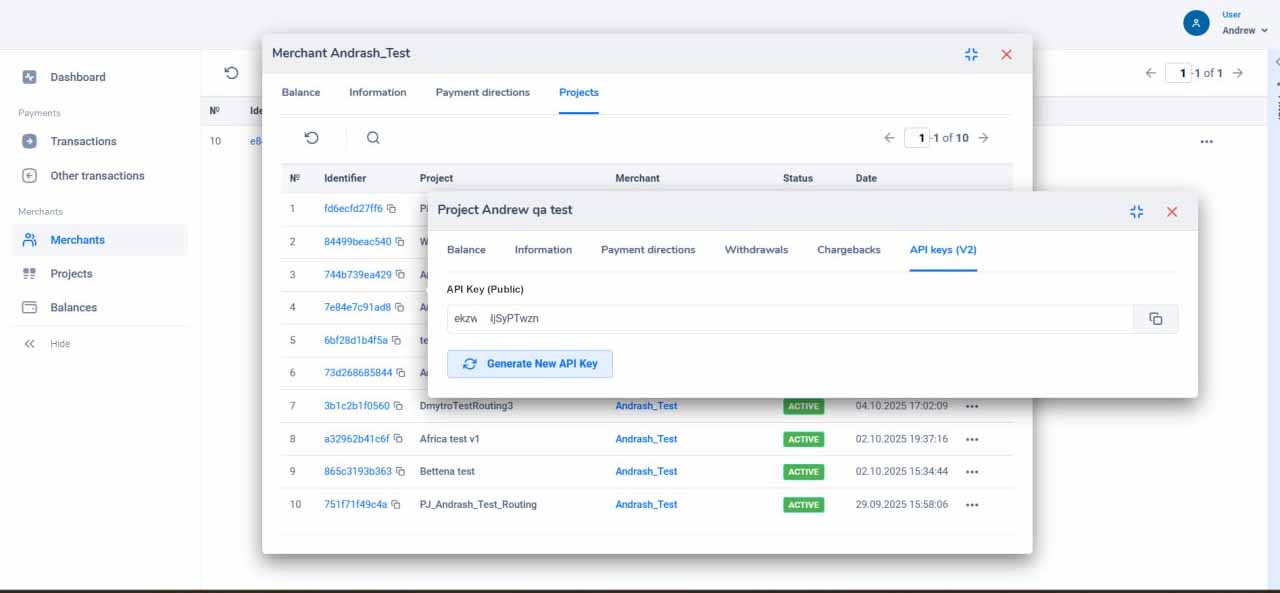
The keys shown below are for documentation purposes only. You must use your own keys from your dashboard for all API requests.
API Key (Public): f5b0899bd9412f75e5d734fce7cb601a4f096e34695gh9f9ab6f1717196704a9
API Secret (Private): d4479c0af1a913c93fa65a9e82fe7374a74890daaa7a8abb423b4a0e47a405a1
Host: payments.apipro.io
Date: 2022-01-01T01:00:00Z (ISO format, UTC)
Signature Process (POST Request)
Step 1: Calculate Digest
Get hash of body using SHA256 algorithm and encode the result with Base64:
digest = "SHA-256=" + Base64.stringify(SHA256(body))
Request Body: {"some": "variable"}
Result: SHA-256=WxDSD/tnly6hK+scOrP/tacMY2lnwHRmgZnm66gv2gU=
Step 2: Prepare Signature Payload
The signature payload structure is dynamic and depends on the payment method:
- Card payments (
method == "card"): Thedateheader is REQUIRED in the signature payload to prevent replay attacks.signaturePayload = "host: " + host + "digest: " + digest + "content-length: " + contentLength + "date: " + dateResult (with Date):
host: payments.apipro.iodigest: SHA-256=WxDSD/tnly6hK+scOrP/tacMY2lnwHRmgZnm66gv2gU=content-length: 20date: 2022-01-01T01:00:00Z - Other methods (APMs, Mobile Money, etc.): The
dateheader is OPTIONAL (can be omitted) in the signature payload, and the base signature payload consists only of host, digest, and content-length.signaturePayload = "host: " + host + "digest: " + digest + "content-length: " + contentLengthResult (without Date):
host: payments.apipro.iodigest: SHA-256=WxDSD/tnly6hK+scOrP/tacMY2lnwHRmgZnm66gv2gU=content-length: 20
Step 3: Create Signature
Creating signature using HMAC-SHA256 and encode the result with Base64:
signature = Base64.stringify(HmacSHA256(signaturePayload, apiSecret))
Result (with Date): XuYYBkHcj6wUeK6i0hJVLwPtsEE+e+pXIBPeoiLxujA=
Result (without Date): VbK5jogbXhGSkdseEt6tAYK5AGvXOuVrM6yIu+jWQxU=
Step 4: Prepare Authorization
The headers parameter in the Authorization header must list the exact headers included in the signature payload.
- With Date header (for cards):
authorization = 'Signature keyId="' + apiKey + '", algorithm="HmacSHA256", headers="host digest content-length date", signature="' + signature + '"'Signature keyId="f5b0899bd9412f75e5d734fce7cb601a4f096e34695gh9f9ab6f1717196704a9", algorithm="HmacSHA256", headers="host digest content-length date", signature="XuYYBkHcj6wUeK6i0hJVLwPtsEE+e+pXIBPeoiLxujA=" - Without Date header (for alternative methods):
authorization = 'Signature keyId="' + apiKey + '", algorithm="HmacSHA256", headers="host digest content-length", signature="' + signature + '"'Signature keyId="f5b0899bd9412f75e5d734fce7cb601a4f096e34695gh9f9ab6f1717196704a9", algorithm="HmacSHA256", headers="host digest content-length", signature="VbK5jogbXhGSkdseEt6tAYK5AGvXOuVrM6yIu+jWQxU="
Step 5: Make POST Request
Depending on whether the Date header is signed, include it in the headers or omit it.
URL: https://payments.apipro.io/v2/payment
Method: POST
Headers (with Date - Card payments):
Content-Type: application/jsonAuthorization: Signature keyId="f5b0899bd9412f75e5d734fce7cb601a4f096e34695gh9f9ab6f1717196704a9", algorithm="HmacSHA256", headers="host digest content-length date", signature="XuYYBkHcj6wUeK6i0hJVLwPtsEE+e+pXIBPeoiLxujA="Digest: SHA-256=WxDSD/tnly6hK+scOrP/tacMY2lnwHRmgZnm66gv2gU=Host: payments.apipro.ioDate: 2022-01-01T01:00:00Z
Headers (without Date - Alternative methods):
Content-Type: application/jsonAuthorization: Signature keyId="f5b0899bd9412f75e5d734fce7cb601a4f096e34695gh9f9ab6f1717196704a9", algorithm="HmacSHA256", headers="host digest content-length", signature="VbK5jogbXhGSkdseEt6tAYK5AGvXOuVrM6yIu+jWQxU="Digest: SHA-256=WxDSD/tnly6hK+scOrP/tacMY2lnwHRmgZnm66gv2gU=Host: payments.apipro.io
Body: {"some": "variable"}
⚠️ Naming convention — snake_case only.
The body sent with Content-Type: application/json must use snake_case / lower case for all field names and for all string identifier values
(method, widget.method, type, etc.) — e.g. first_name, callback_url, "method": "card", "method": "bank_transfer".
Do NOT use camelCase, PascalCase or UPPER CASE: firstName, "Method", "CARD", "BANK_TRANSFER" will not be recognized —
the request fails with Required fields are missing or the payment method is rejected. Field names are case-sensitive.
Signature Process (GET Request)
For GET/DELETE requests, the signature payload is simpler (no digest or content-length) and also supports dynamic date headers:
Step 1: Prepare Signature Payload
- With Date header:
signaturePayload = "host: " + host + "date: " + dateResult (with Date):
host: payments.apipro.iodate: 2022-01-01T01:00:00Z - Without Date header:
signaturePayload = "host: " + hostResult (without Date):
host: payments.apipro.io
Step 2: Create Signature
Creating signature using HMAC-SHA256 and encode the result with Base64:
signature = Base64.stringify(HmacSHA256(signaturePayload, apiSecret))
Result (with Date): 2TDHARcWgr94OTNZP7rBCQbF05lkLyMl4EJAbRfmamE=
Result (without Date): l4nxhSBpvZ/BCDkoVsUz0gjozutMpw34t7s1Be7xIS8=
Step 3: Prepare Authorization
- With Date header:
authorization = 'Signature keyId="' + apiKey + '", algorithm="HmacSHA256", headers="host date", signature="' + signature + '"'Signature keyId="f5b0899bd9412f75e5d734fce7cb601a4f096e34695gh9f9ab6f1717196704a9", algorithm="HmacSHA256", headers="host date", signature="2TDHARcWgr94OTNZP7rBCQbF05lkLyMl4EJAbRfmamE=" - Without Date header:
authorization = 'Signature keyId="' + apiKey + '", algorithm="HmacSHA256", headers="host", signature="' + signature + '"'Signature keyId="f5b0899bd9412f75e5d734fce7cb601a4f096e34695gh9f9ab6f1717196704a9", algorithm="HmacSHA256", headers="host", signature="l4nxhSBpvZ/BCDkoVsUz0gjozutMpw34t7s1Be7xIS8="
Step 4: Make GET Request
URL: https://payments.apipro.io/v2/payment
Method: GET
Headers (with Date):
Content-Type: application/jsonAuthorization: Signature keyId="f5b0899bd9412f75e5d734fce7cb601a4f096e34695gh9f9ab6f1717196704a9", algorithm="HmacSHA256", headers="host date", signature="2TDHARcWgr94OTNZP7rBCQbF05lkLyMl4EJAbRfmamE="Host: payments.apipro.ioDate: 2022-01-01T01:00:00Z
Headers (without Date):
Content-Type: application/jsonAuthorization: Signature keyId="f5b0899bd9412f75e5d734fce7cb601a4f096e34695gh9f9ab6f1717196704a9", algorithm="HmacSHA256", headers="host", signature="l4nxhSBpvZ/BCDkoVsUz0gjozutMpw34t7s1Be7xIS8="Host: payments.apipro.io
Code Examples
POST Request
const request = require('request');
const sha256 = require('crypto-js/sha256');
const hmacSHA256 = require('crypto-js/hmac-sha256');
const base64 = require('crypto-js/enc-base64');
const moment = require('moment');

const apiKey = 'f5b0899bd9412f75e5d734fce7cb601a4f096e34695gh9f9ab6f1717196704a9';
const apiSecret = 'd4479c0af1a913c93fa65a9e82fe7374a74890daaa7a8abb423b4a0e47a405a1';

const date = moment().utc().format();
const host = 'payments.apipro.io';

// Request body example
const body = '{"some": "variable"}';
const parsedBody = JSON.parse(body);

// Date header is REQUIRED only for card payments
const includeDate = parsedBody.method === 'card';

// Get hash of body using SHA256 algo and encode the result with Base64
const digest = 'SHA-256=' + base64.stringify(sha256(body));

// Build signature payload and headers dynamically
let signaturePayload = 'host: ' + host + 'digest: ' + digest + 'content-length: ' + Buffer.byteLength(body, 'utf8');
let signedHeaders = 'host digest content-length';

if (includeDate) {
    signaturePayload += 'date: ' + date;
    signedHeaders += ' date';
}

// Creating signature using HMAC-SHA256 and encode the result with Base64
const signature = base64.stringify(hmacSHA256(signaturePayload, apiSecret));

// Preparing authorization header
const authorization = 'Signature keyId="' + apiKey + '", algorithm="HmacSHA256", headers="' + signedHeaders + '", signature="' + signature + '"';

// Setup request headers dynamically
const headers = {
    'Content-Type': 'application/json',
    'Authorization': authorization,
    'Digest': digest,
    'Host': host
};
if (includeDate) {
    headers['Date'] = date;
}

// Post request
request(
    {
        'method': 'POST',
        'url': 'https://payments.apipro.io/v2/payment',
        'headers': headers,
        body: body
    },
    function (error, response, body) {
        console.log('error: ', error);
        console.log('statusCode: ', response && response.statusCode);
        console.log('body:', body);
    }
);
GET Request
// Date header is OPTIONAL/OMITTED for non-card methods
const includeDate = false;

// Build signature payload and headers dynamically
let signaturePayload = 'host: ' + host;
let signedHeaders = 'host';

if (includeDate) {
    signaturePayload += 'date: ' + date;
    signedHeaders += ' date';
}

// Creating signature using HMAC-SHA256 and encode the result with Base64
const signature = base64.stringify(hmacSHA256(signaturePayload, apiSecret));

// Preparing authorization header
const authorization = 'Signature keyId="' + apiKey + '", algorithm="HmacSHA256", headers="' + signedHeaders + '", signature="' + signature + '"';

// Setup request headers dynamically
const headers = {
    'Content-Type': 'application/json',
    'Authorization': authorization,
    'Host': host
};
if (includeDate) {
    headers['Date'] = date;
}

// Get request
request(
    {
        'method': 'GET',
        'url': 'https://payments.apipro.io/v2/payment',
        'headers': headers
    },
    function (error, response, body) {
        console.log('error: ', error);
        console.log('statusCode: ', response && response.statusCode);
        console.log('body:', body);
    }
);
Ready to get started?
Explore our documentation to integrate ApiPro into your application:
- Authentication & Signature — Learn how to authenticate your API requests
- Payment Methods — Browse available payment methods and integration guides
- Postman Collection — Ready to test the ApiPro API